Alerts & webhooks

Know the moment it buys.

A sound, a desktop notification and a Discord message for every card it wins, misses or lists, and for anything that stops the run.

Three ways to be told. Pick any.

All of them are optional, and each alert type is a separate switch.

Sounds

A bell when a card is bought and a lower buzz when one is missed, so you can leave the tab behind and still know what happened.

Desktop notifications

Chrome notifications for buys, stops and captchas. Useful when the web app is in a background tab or another window.

Discord webhooks

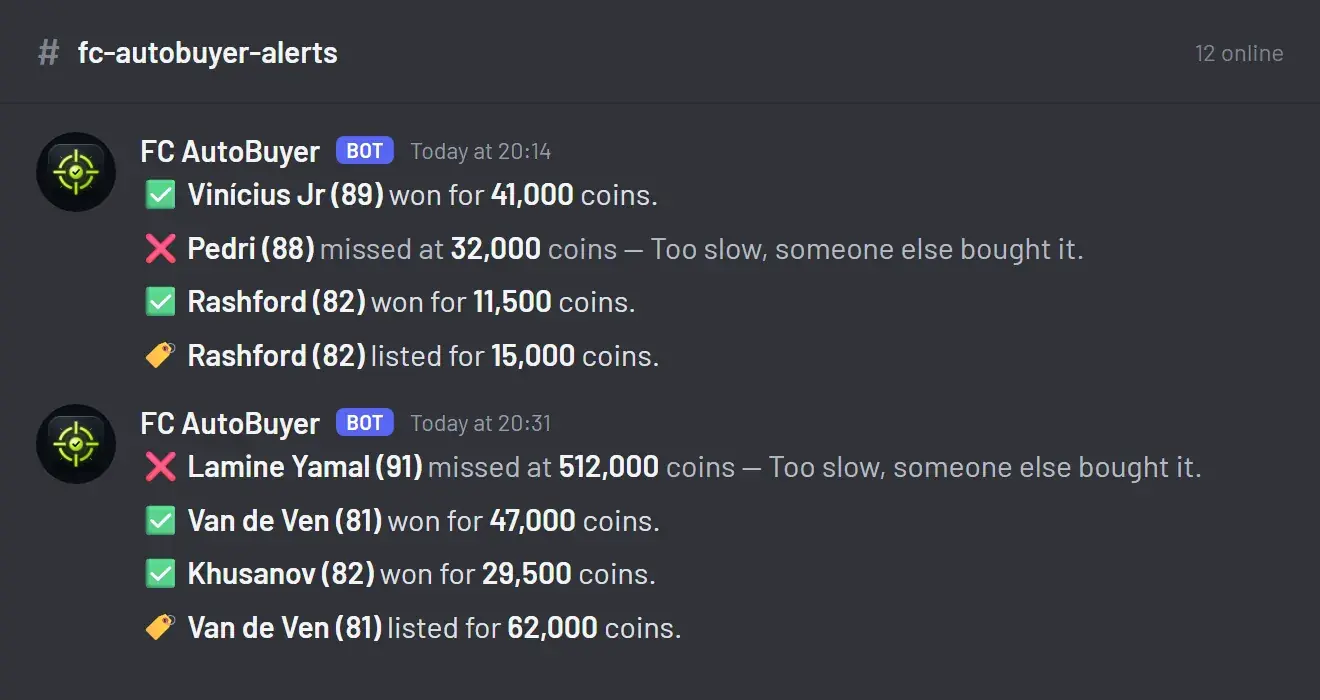
One line per card in a channel of your choice, which also gives you a running log you can scroll back through later.

Set up

Paste a URL. That's the setup.

Make a webhook in your Discord channel settings, paste it in, and press Send test.

  • A switch for each alert: bought, missed, listed, stopped, captcha, summary
  • A test message so you know it works before a run
  • Run summaries with searches, buys, misses and coins spent
  • Nothing but the message leaves your computer
See every feature →
A Discord channel showing FC AutoBuyer alerts: cards won with a tick and the price, cards missed with a cross, and cards listed

Why alerts matter more than they sound

An autobuyer is meant to be left alone, which is exactly why you need telling when something happens. The two moments that matter are the good one, a card bought under its price, and the bad one, the run stopping. Without alerts you find out about both by going back and looking, which rather defeats the point.

The messages are deliberately short. A tick, the player, the price. Skimming a channel later tells you what a session actually did, and a run of crosses tells you your price is set too close to the market and other people are getting there first.

Alerts that mean stop what you are doing

A captcha alert is the one to act on. EA wants to see a human, the run has already ended, and the sooner you solve it the sooner you can start again. A soft ban alert means your searches are being throttled, and the right response is to leave it alone for a while: our guide on the transfer market soft ban explains how long that usually takes.

What gets sent

Only the message itself: the card, the price, the reason a run stopped. No account details, nothing about your club, and nothing at all unless you have pasted in a webhook URL. The privacy policy has the full detail, and the rest of the controls are covered on the safety page.

More of what it does

Every part of FC AutoBuyer, explained on its own page.

Auto buy players

Set a filter and a price; it buys matching cards the moment they list.

Auto buy players →

Auto list players

Every card it buys goes straight back up, and never below what it paid.

Auto list players →

Safety limits

Hard spending limits, pacing and an auto-stop on trouble.

Safety limits →

Run history

Every run recorded: speed, buys, misses and why it stopped.

Run history →

Common questions

One line each: a tick and the player and price when it buys, a cross when a card is sniped from under it, and a tag when a card is listed. Run summaries and problems come through as a fuller message.

You need somewhere to send the messages, which can be a server you own or a private one you make in a few seconds. Create a webhook in the channel settings and paste the URL into the extension.

Yes, each type is a switch: bought, missed, listed, stopped, captcha and the run summary. Turn off the ones you do not care about.

Yes, and those are the ones worth keeping on. A captcha, a soft ban or a run of errors ends the run and sends a message saying why, so you are not left thinking it is still going.

Yes. A bell when it buys, a lower buzz when a card is missed, plus sounds for breaks and problems, and optional desktop notifications. There is a Try button so you can hear them without waiting for a run.