Built-in limits

Hard limits. Not promises.

Every coin it spends is checked against limits you set, and anything unexpected stops the run rather than pushing on.

Three kinds of brake. All on by default.

Spending, pacing and stopping are handled separately, so one slip cannot cascade.

Spending

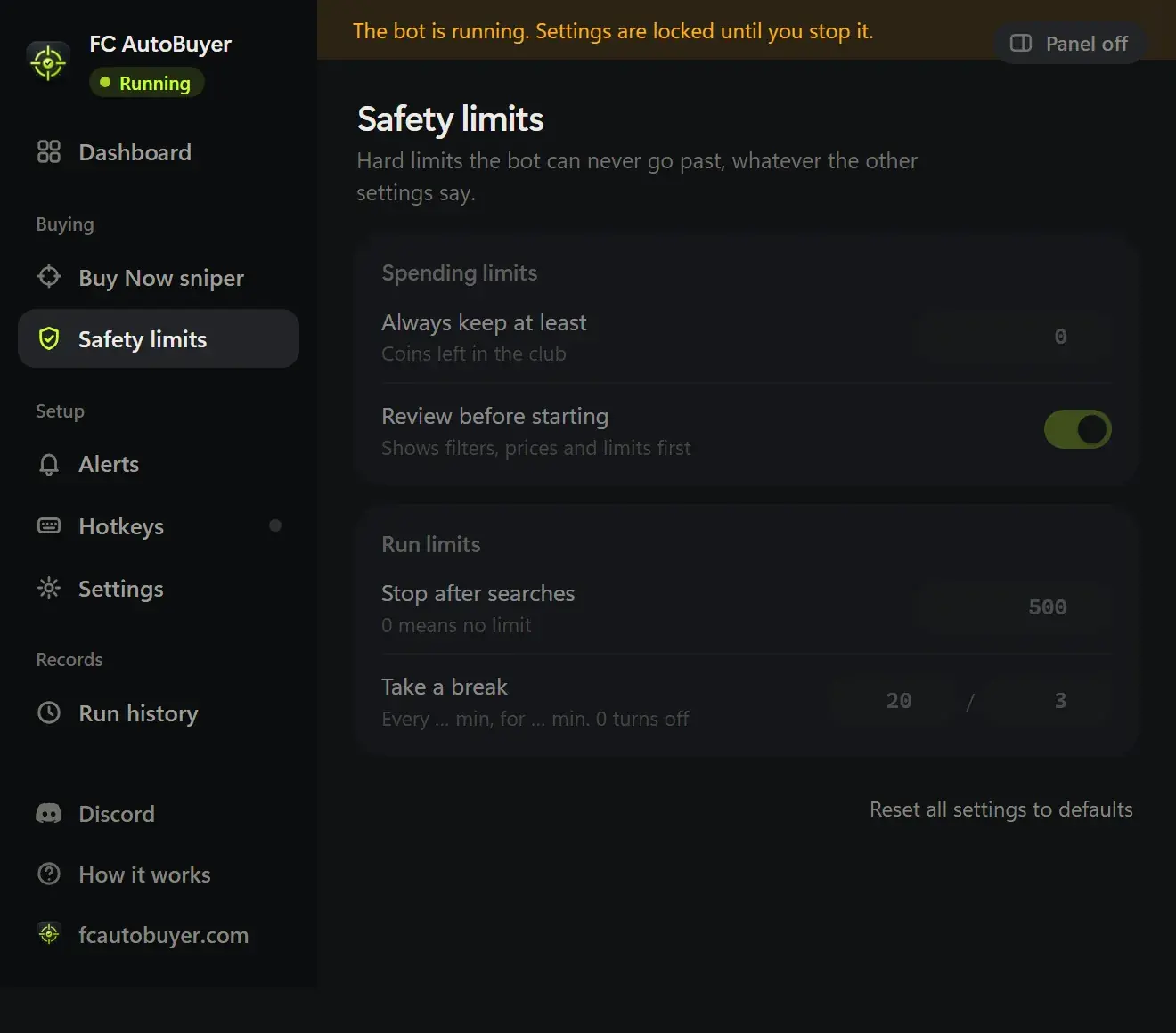
A max price per card, a budget for the run and a number of coins to keep back. All three are checked right before the coins leave, never just at the start.

Pacing

Randomised gaps between searches, four speed presets, scheduled breaks and caps on searches, minutes and cards bought.

Stopping

Captchas, soft bans, expired sessions, low coins and repeated errors all end the run, with a sound, a notification and a line in the log saying exactly why.

Spending

It cannot overspend.

The limits are the point of the tool, not a setting buried three pages deep.

  • Max price per card, checked before every buy
  • Run budget and a coins-to-keep limit it will not cross
  • Stops if far more cards match your price than expected
  • Prices and limits lock while a run is going
How auto buying works →
FC AutoBuyer safety settings with spending limits, search speed presets and scheduled breaks

What a run actually looks like

A careless autobuyer searches as fast as the market will answer, all day, from one account. That is the behaviour EA looks for, and it is why people end up restricted. A sensible one looks more like a person who is quick but human: a gap between searches that is never the same twice, a break every so often, and a session that ends rather than running all night.

FC AutoBuyer is built that way by default. Search delays are randomised inside the preset you pick, breaks are scheduled, and a run has a time limit, a search limit and a limit on how many cards it buys. Nothing stops you turning the speed up, but the fast presets are meant for short bursts, and the extension says so when you pick one.

When it stops by itself

Stopping early is usually the right move. A captcha means EA wants to see a human, a soft ban means your searches are being throttled, and a run of errors usually means the Web App has changed under it. In all three cases FC AutoBuyer ends the run and tells you, rather than hammering away at a market that has stopped answering. Our guide to the transfer market soft ban explains what triggers one and how long it lasts.

What it never does

It never asks for your EA password, never logs in for you, and never touches your account outside the Web App tab you have open. It does not sell coins, buy coins or talk to any coin service. If you want the detail, the privacy policy sets out exactly what is stored, which is almost nothing, and all of it on your own computer.

The risk that remains

Being honest about it: using any autobuyer breaks EA's terms for Ultimate Team, and a ban is possible however carefully you run it. Keeping runs short, the speed sensible and the account one you can afford to lose is the only real protection. There is more in how to avoid a ban when using an autobuyer, protecting your account while trading and our terms.

More of what it does

Every part of FC AutoBuyer, explained on its own page.

Auto buy players

Set a filter and a price; it buys matching cards the moment they list.

Auto buy players →

Auto list players

Every card it buys goes straight back up, and never below what it paid.

Auto list players →

Run history

Every run recorded: speed, buys, misses and why it stopped.

Run history →

Common questions

No. A max price per card, a budget for the run and a coins-to-keep limit are all checked immediately before every single buy, and again after any delay, so a price that moved while it was waiting cannot slip through.

It stops the run immediately and tells you, with a sound and a desktop notification. It never tries to answer a captcha, and it will not start again until you solve it yourself and press Start.

No. Two errors in a row end the run by default. An expired session, a soft ban, a locked market or running out of coins all stop it on the spot.

No. If listing is switched on, the prices are checked before the run and again for every card, against what that card actually cost, after EA's 5% tax. A card that cannot be listed safely is left in your Unassigned pile.

No third-party tool is risk-free. Using one goes against EA's terms for Ultimate Team and can lead to a transfer market ban or an account ban. The limits, delays and breaks here reduce how much attention a run draws, but they cannot remove the risk, and you use it at your own risk.