Run records

Every run, on the record.

Searches, buys, misses, coins spent and the reason it stopped, for every session you have ever run.

Numbers worth having. All local.

Recorded automatically at the end of every run.

This session

Searches, bought, missed, spent, found and skipped, updating live, with your success rate and searches per minute.

Lifetime

The same totals across every run you have done, so you can see whether a change to your filters actually helped.

Why it stopped

Your own limit, a captcha, a soft ban or an error, recorded with the code, so a bad session explains itself.

History

Copy it. Share it.

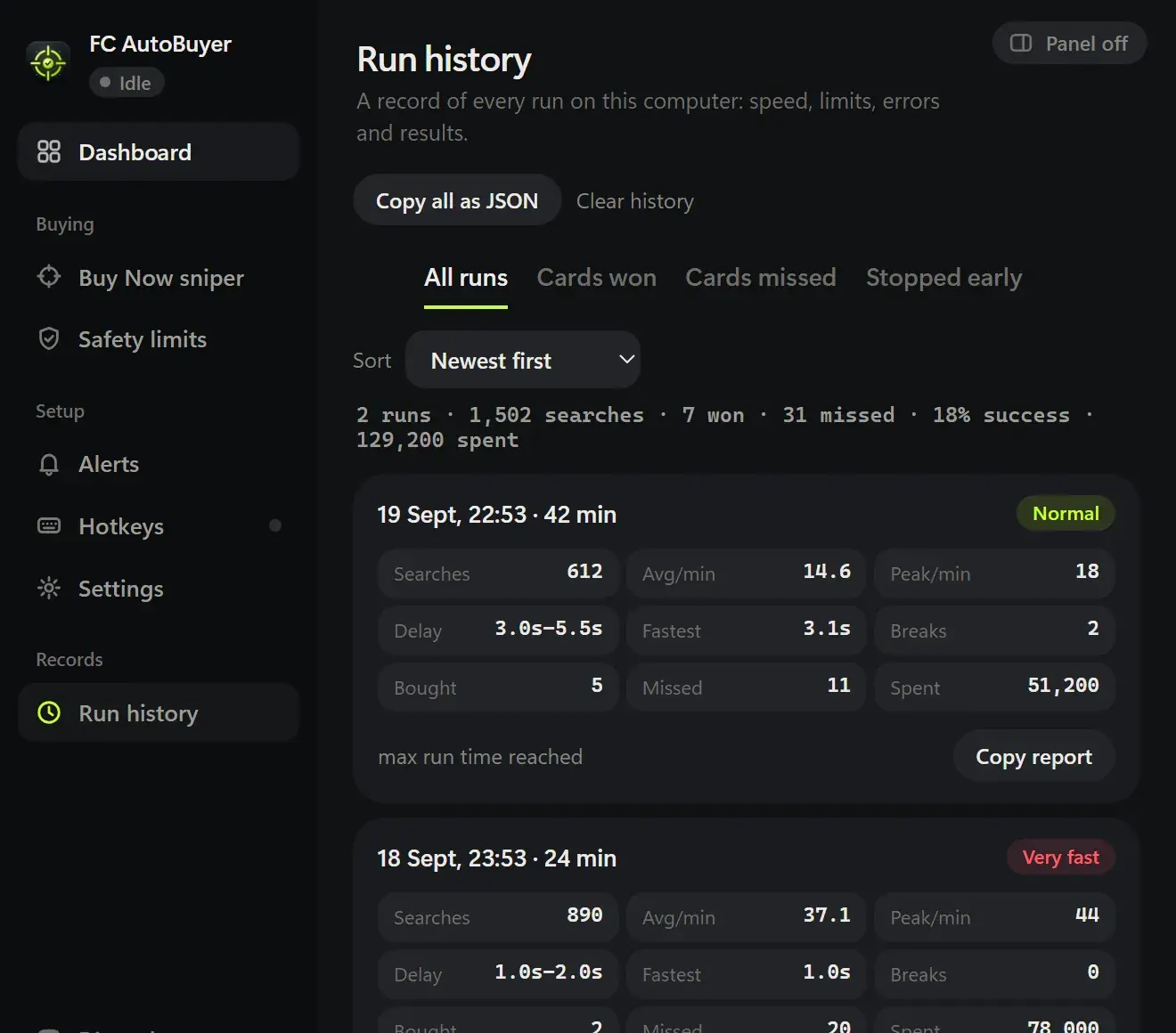
One click copies a full report of a run, which is the fastest way to get help when something looks wrong.

  • Average and peak searches per minute
  • Soft bans and captchas flagged against the run
  • The filters and pacing settings the run used
  • Kept on your computer, cleared whenever you like
Send us a run →
FC AutoBuyer run history showing past runs with searches, cards bought, coins spent and why each run stopped

What the numbers tell you

Two numbers explain most of what happens in a session. The first is searches per minute: if it is far below your speed setting, something is slowing the run down, usually errors or a throttled market. The second is your success rate, buys against misses. A run of misses means the cards are there but other people are getting them, which is a pricing problem, not a speed one.

Skipped cards are worth a look too. A high skip count usually means your ratings-to-skip list is catching more than you intended, or your per-card limit is stopping buys your filter allows.

Using history to improve

Change one thing at a time and compare runs. A narrower filter, a lower price, a different time of day. Our transfer market trading guide covers when the market is worth sniping, and the best times to buy and sell explains why the same filter can be quiet at noon and busy at six.

When a run stops badly

A captcha or a soft ban on the record is a signal to slow down before it happens again: fewer searches a minute, shorter runs, breaks left on. The safety page covers the controls, and the soft ban guide explains what EA is actually reacting to.

More of what it does

Every part of FC AutoBuyer, explained on its own page.

Auto buy players

Set a filter and a price; it buys matching cards the moment they list.

Auto buy players →

Auto list players

Every card it buys goes straight back up, and never below what it paid.

Auto list players →

Safety limits

Hard spending limits, pacing and an auto-stop on trouble.

Safety limits →

Common questions

How long the run went for, searches and searches per minute, cards found, bought, missed and skipped, coins spent, the filters used, any error codes, and the reason it stopped.

On your own computer, in the extension's local storage. Nothing is uploaded, and clearing it is one button.

Yes. Copy a full report in one click and paste it into Discord, which is the quickest way for us to help when something looks wrong.

A running total across every finished run: searches, cards bought and missed, coins spent and time spent. The Dashboard shows this session or lifetime side by side.

Because the reason is usually the useful bit. A run that ended on its own limit is healthy; one that ended on a captcha or a soft ban tells you to slow down.